Friday, February 10, 2012

Lookie lookie--here comes.....Cupcakes :)


I have been so BLAH the last few weeks! Does anyone else have a sincere dislike for the month of January? It's so long and cold and dreary. 

But that's just the thing...it was kind of nice here in Lexington, KY. How about where you are? We spent some time outside, enjoying the unseasonably warm weather.

But I also joined Weight Watchers in January and don't think I've mentioned that, here. I'm enjoying it very much! I'm about to have my 6th weigh in on Monday. So far, I've lost 17 lbs and dropped a pant size! 

I'm not the best chef or anything, but I've been in the kitchen a LOT more thanks to WW, and have discovered some great recipes! I got the recipe for these cupcakes online elsewhere, but the icing is my own concoction...I'd love to share it with you now!

Strawberry Cheesecake Cupcakes

1 box of strawberry cake mix
8 oz of diet 7-up

Preheat oven to 350 degrees and line cupcake tins
Mix diet 7-up with strawberry cake mix, and pour into 18 cupcake liners.
Bake for 18 minutes

Topping:

4 oz Neufchatel cheese
1 cup Cool Whip--lite, regular or sugar free
3 packets of Splenda (optional)
sliced strawberries to garnish

Mix together 4 oz cheese, Splenda and 1 cup of Cool Whip using a hand mixer. *Note: You can use cream cheese instead but the Neufchatel is lower in points and point values are based on Nuefchatel. I tried using fat free Cool Whip and it did not whip up properly, but any of the other kinds are suitable and all have similar point values. Once these ingredients are mixed and cupcakes are cooled, spread topping on cupcakes and garnish with fresh strawberry slices. 

Yields 18, Points Plus per serving is 3PP for the cupcake and 1PP for the topping for a total of 4PP =)

Not only did I adore these, but so did my entire family! 

And with that, I'll leave you...and I'll try to not be such a stranger! ;)


Monday, January 9, 2012

Happy Stabbyday!


Photo courtesy of The Bloggess, of course. 

I felt stabby today.

ALL DAY. 

Like in a "Who wants some next?" sort of way.

Turns out, it was a full moon.

This makes a lot of sense. It's not a bunch of hoopla. My kids turn into raging lunatics at full moon time. They are THE sweetest, most loving and precocious children but they literally become posessed with spawn of fullmoonmonster or something.

And the doctor's office. 

Ugh.


Unfortunately this is a real screenshot of my phone from this afternoon. Nothing out of the ordinary...a few calls to my sister and my husband, a call to the gym to find out what time Spinning class was.

Not that it mattered. Because I had to miss it. Because That call I made this morning to University of Kentucky Polk Dalton Clinic? When they told me, "We can't get you seen today, call the Twilight clinic at 3." This is their policy. "Twilight" means after hours to them and there's a dedicated clinic for it.

So, I had to call at 3. Look how many times I had to try. LOOK! SEVENTY! I got a busy signal sixty nine times before it finally rang. Now tell me I didn't want to throw my m-f phone out the window. I started calling at 3 and you see I finally got through at 3:44. Every time the busy signal came through my blood pressure raised a point.

Why am I stabby?

That's just a few reasons I was stabby. There are more. I'll stop now because I think those alone are enough to make a person stabby.

I took Parker into the clinic. He got diagnosed-ish. Scarlett fever with no longer accompanying strep throat (cured itself the Dr. said). Erupting eczema. (I TOLD THEM he had strep a month ago, I saw the scarlett fever rash then and they refused to see him, telling me to give him benadryl. They are IDIOTS!) He got sent home with a few creams. Hopefully they'll make my little man feel better. The kids were so ridiculously ill-behaved in the clinic that I just wanted to leave them there :P I think they touched EVERY surface, and licked most of them, too. So now they'll be even sicker. Yay.

I'm going to go to sleep now, and hope that I have stabby dreams that help me wake up refreshed and ready to have a not-too-stabby day tomorrow.

Saturday, January 7, 2012

Motivation


I saw a quote today on the Internet. I was so enamored with the quote I decided to make a pretty version of the quote so I could enjoy it even more :) 

I am eating better and exercising this year...I'm a week in so far, and my motivation is great at this point. But history tells me it will wane soon. I'm preemptively working on things to help keep me motivated. And since I also bathe daily, well this just made sense. 

This paper I used is from Bella Gypsy Designs' A Little Hope Fade To White Papers and the font is CK Jot.

Project 365 + 1

So it's a leap year...which means Project 365 becomes Project 366. I am working on it this year with renewed fervor. I feel good about finishing this project. After all, I *did* complete December Daily in 2011. And if I can do that, I can take a measley photo a day, right? Right.

Here are this year's photos, so far :)


1.1.12 | 1 of 365 | A Spoonful of Sugar | I would like to start my album cheerfully, but this project should be truthful, and this was how I began my year. A bag of medication from Walgreen's after a pre-dawn ER visit. I did, however, pick up a bag of Christmas-clearance Cadbury egg candies. Y'know, a spoonful of sugar and all.


2 of 365 | 1.2.12 | 37 Never Looked So Good | We have a birthday boy in the house today! I got him to take a break from the book he was reading this afternoon just long enough to smile for a photo.


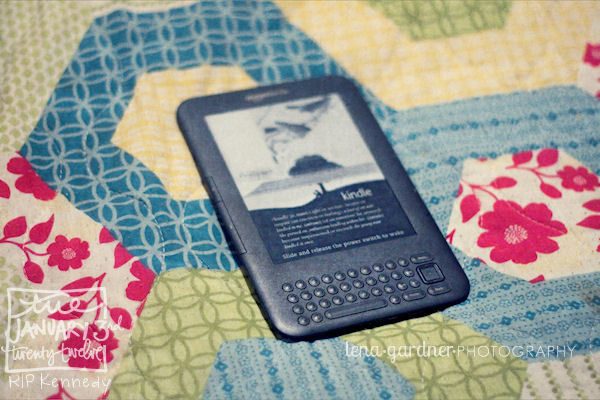
 3 of 365 | 1.3.12 | RIP Kennedy | Yes, my Kindle's name is Kennedy. She died and I spent a good portion of my day on the phone with Amazon customer service, weighing my options and researching, and ultimately picking out a new Kindle Touch at no cost to me, which will arrive Thursday.


4 of 365 | 1.4.12 | Good Choices | It's time for me to be less of a fatty so I joined Weight Watchers. I've had some success in the past doing their online version, but this is my first time going to meetings. I went to a meeting today. It was fun :)


5 of 365 | 1.5.12 | Meet Kendall | The UPS man brought my new baby today. I always name my belongings mnemonically. Since I named my last Kindle Kennedy, I needed a new name for this one. Meet Kendall. (By default, the screen said "Jolena's 2nd Kindle". I was SO not letting that fly.)


6 of 365 | 1.6.12 | Hard At Play | Naomi was saving our living room, one villain at a time, this afternoon. As Spidergirl. With her Nerf gun.


Monday, January 2, 2012

Creating A Signature Clickable To Multiple Destinations

I'm going to help you make a forum signature, or siggy, that is divided into different sections. This will make different areas of your signature clickable thru to different destinations. 

First, you're going to create your signature using your program. The forum guidelines of the places you frequent will dictate your size, but the one I made was 600x300 pixels. I used Paint Shop Pro X3 to create my signature and this tutorial. I'm also a PSCS2 user, however, and the idea will translate to any program, you may just need to tweak slightly for your program. I've followed plenty of PS tutorials in PSP :) 


When you're creating your siggy, you're going to want to be sure the area you want people to click thru to get to your gallery, for instance, doesn't overlap with the area they would click thru to get to your blog.

Here's a preview of the files you're going to have when we're done with the tutorial:


A finished 600x300 pixel .png file, and 5 different columns saved as individual .png files.


First, open your finished .png siggy in your program.


Because my siggy is 600 pixels wide and I want it to click thru 5 ways, I divide 600 by 5 and get 120 pixels.   I go to View>Change Grid, Guide & Snap Properties and change my Current Image Settings to 120x120.  I also ensure my grid is "on" by using my keyboard shortcut of Ctrl+Alt+G or choosing View>Grid.

If you are working with a 600 pixel wide canvas and want your image to click thru to 6 locations, grid it 100x100 pixels. If you are working with a 600 pixel wide canvas and want your image to click thru to 4 locations, grid it 150x150 pixels, and so on and so forth.


Once I select "OK" my image will be gridded.


Select Ctrl+ Shift+ G to Snap to Grid or you can do it from View>Snap To Grid. Use the Selection Tool to select the first column only. Copy your selection by choosing Edit>Copy or a keyboard shortcut and paste your selection as a new image by choosing Edit>Paste As New Image or using a keyboard shortcut. Save the new image as a .png (I saved mine part 1, part 2, part 3, etc but name yours whatever you'd like.)


Once that is done, select the the area of the second column using the Selection Tool and repeat the steps above.  

Do this for all of the columns you wish to have. I saved 5 separate .png files. 

Upload them to your photo hosting site. I used Photobucket. 

Once you have that done, go to the Control Panel for the forum you want to display your siggy in and select Edit Signature.

(I'm not going to include screenshots for this portion because every forum could be different but the steps should be similar no matter what.)

Paste in the image code for your first column from your image hosting site in your signature box.

[IMG] http://www.imagehostingsite.com/myusername/column1.png [/IMG]

Highlight this image code with your mouse and select the "Insert Link" button. A box will pop up asking you where to link the image to. Paste into the popup box the web location you want that portion of your siggy to link to. 

When you're finished with that, it will look like this:

[URL=http://www.website.com/destination][IMG]http://www.imagehostingsite.com/myusername/column1.png[/IMG][/URL]

With NO SPACES, you'll continue to do this for all of the columns you have created. It will look like a lot of info when you're done!

My code, when I was all done, looked like this:

[CENTER][URL="http://www.myscrapbookart.com/gallery/showgallery.php?cat=500&ppuser=276"][IMG]http://i243.photobucket.com/albums/ff258/bellagypsygirl/Stuff%20De%20Lena/part1.png[/IMG][/URL][URL="http://365project.org/lenagardner/365"][IMG]http://i243.photobucket.com/albums/ff258/bellagypsygirl/Stuff%20De%20Lena/part2ish.png[/IMG][/URL][URL="http://pinterest.com/mrslenagardner/"][IMG]http://i243.photobucket.com/albums/ff258/bellagypsygirl/Stuff%20De%20Lena/part3.png[/IMG][/URL][URL="http://lenagardner.blogspot.com"][IMG]http://i243.photobucket.com/albums/ff258/bellagypsygirl/Stuff%20De%20Lena/part4.png[/IMG][/URL][URL="http://www.facebook.com/mrslenagardner"][IMG]http://i243.photobucket.com/albums/ff258/bellagypsygirl/Stuff%20De%20Lena/part5.png[/IMG][/URL][/CENTER]

I am NOT a tutorial writer by trade, but I hope you've found it helpful. I am HAPPY to answer any questions you might have or assist you if you are struggling with this! Just leave me a message here if you have any questions! 

January Scrapping Portfolio

I want to make a post for me to keep a running tally of my January layouts for the Sweet Shoppe Designs Scrapper's Portfolio. I'll have a thread at SSD but I also want to keep them here, for me. <3


Doodle Days by Jacque Larsen
Embrace the Everyday by Traci Reed Designs
Font is The Future Freaks Me Out by Heather Hess
Misc doodles by MandaBean and Fee Jardine


Sweet Shoppe Designs January Scrapper's Portfolio #15

The Little Things You Say by Lauren Grier Designs
Not Quite The Full Picture by Little Green Frog Designs


Zoom Zoom by Zoe Pearn
Transformers 13 by Lauren Reid

Tuesday, December 27, 2011

Inconsistency is the key!

Last year, I blogged EVERY DAY during the month of December while participating in Reverb 10. This year, I haven't blogged once during the month. Instead, I worked on a project similar to December Daily. I called mine Countdown To Christmas and I'll share it in an upcoming post.


Facebook is becoming more and more like a blog. I've had the new timeline since October, and I love it. But still I can't group things the way I'd like to have them. I still think, as redundant as it seems, that I want to keep a personal blog. I just need to be a little more consistent with it.


My 2012 One Little Word is Begin. Occasionally I have a hard time finishing things that I've started, but more often than not I never even begin. That's a tough pill to swallow because I've never identified as a procrastinator. Rather, I'm a perfectionist who truly believes conditions must be perfect, every detail discussed and planned, before I can begin any new project or journey. My goal in 2012 is to embody the word begin. I love the quote, "To begin, begin." It is simple yet for some, difficult. I wanted to share this bit I found on the Internet. I think it will help as a visual for my journey.

If you'd like to check out other visual aides in my journey, I've created a Pinterest pinboard for my One Little Word!

Until next time, friends!